Sema Image
A thermal camera can lose useful detail before its electronics show any problem. A thumbprint, dried rain spot, or fine layer of dust may soften the image and reduce confidence in temperature readings. The lens coating is delicate. Scrubbing it like ordinary glass can cause lasting damage. Knowing how to clean and maintain a thermal camera lens safely starts with a simple habit: inspect first, clean only when needed.
Optics-repair specialist Roger Cicala has discussed careful lens handling and cleaning. A concise paraphrase of that cautious approach is: “Use the gentlest method that removes the contamination, and stop once the surface is clean.” This is a paraphrase, not a verbatim quotation. It captures an important point: unnecessary wiping can create scratches, especially when grit is trapped beneath a cloth.
In this guide, you’ll learn how to clean and maintain a thermal camera lens safely, from checking the manufacturer’s instructions to choosing suitable tools. Picture a dusty lens after a day in the field: use a hand blower first, then a clean lens brush if particles remain. Avoid household cleaners, rough tissues, and direct pressure. Small details matter. Thermal cameras differ, and some use protective windows or coatings that need specific care. If residue persists, or the lens appears scratched, pause and consult the camera manufacturer or a qualified service technician. A careful routine helps protect image quality without promising that every mark can be removed at home.
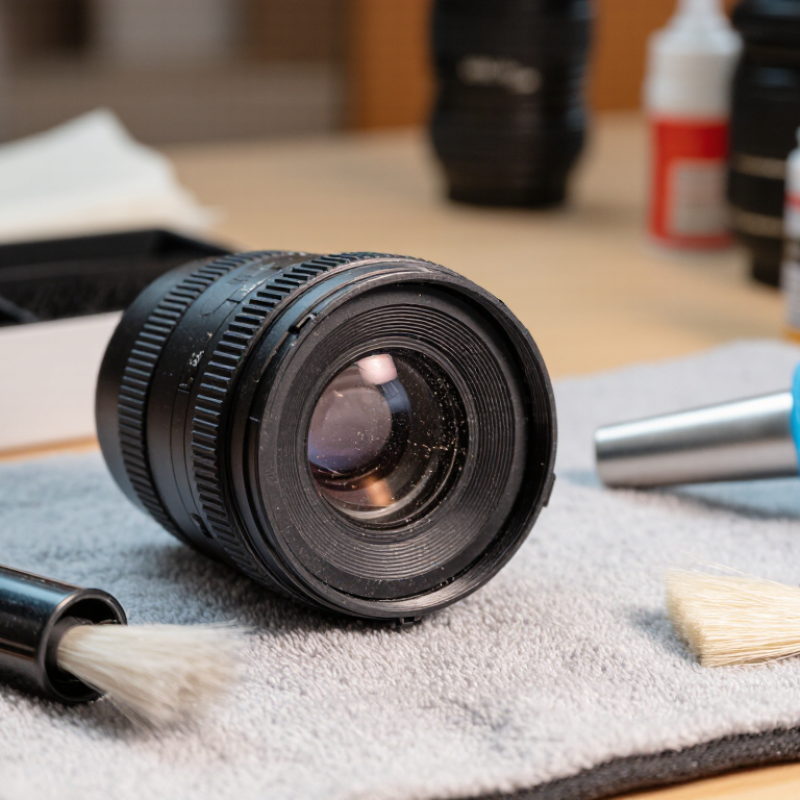
Thermal camera lenses may use germanium or other infrared-transmitting materials, not ordinary optical glass. Their surfaces often carry thin antireflection coatings that help more infrared energy reach the detector. These coatings can be delicate. A lens may look like a dark, solid window, but tiny scratches or residue can affect image clarity.
Check the camera instructions before cleaning. Dust should be removed with a hand blower, not a breath, which can leave moisture behind. If a mark remains, use only a cleaning fluid approved for that lens material and coating. Apply a small amount to a clean optical swab, then wipe gently from the center outward. Do not scrub. Small details matter. Paper tissues, household glass sprays, and abrasive cloths may damage a coating or leave fibers. Even a solvent that works on one lens may harm another.
Keep the lens capped when the camera is stored, and avoid touching its surface with bare fingers. If the image looks hazy, first check for dust on the outside; internal fogging needs professional attention. It is tempting to keep wiping until every faint mark disappears. That can cause more harm than leaving a harmless stain, so pause when the surface is clean enough for reliable imaging.
The bars show approximate wavelength ranges in which these materials can transmit infrared radiation; actual performance depends on material grade, lens thickness, and coatings. Because coatings can be delicate, follow the camera or lens manufacturer’s cleaning instructions. Use a clean, soft, lint-free cloth and only an approved cleaner; avoid abrasive materials and unapproved solvents.
Before cleaning, switch off the thermal camera and let the lens reach room temperature. Remove its battery if the manual permits. Work under bright, indirect light, with the camera resting on a clean, dry surface. Many long-wave thermal systems operate in the 8–14 μm band; ISO 18434-1:2008 describes infrared thermography procedures for condition monitoring. That range is one reason to use supplies intended for optical surfaces, not household glass cleaner. Keep dust away from the exposed lens. A hand blower can lift loose particles without rubbing them across the coating. Avoid canned air, which may propel residue or leave liquid behind.
Choose clean optical tissue or a lint-free lens wipe, plus a cleaning fluid explicitly approved for the camera’s lens materials. Apply a small amount to the wipe, never directly onto the lens, and move gently from the center outward. ASTM E1933-14(2022) covers emissivity measurement using infrared imaging; it is a useful reminder that surface conditions matter to reliable readings, though it is not a lens-cleaning guide. Don’t use paper towels, abrasive cloth, or unapproved solvents. They can scratch or affect coatings. Inspect the glass at an angle before wiping; a tiny speck may be less harmful than unnecessary contact. I still find this step easy to rush. Take another look.
A thermal camera lens can look clean while holding fine grit along its rim. Switch the camera off and let the lens cool before cleaning. Work in a still, well-lit area, then inspect the surface from an angle. A small flashlight can reveal particles that direct light hides. Handle the camera by its body, not the lens.
Start with a clean rubber air blower. Hold the lens downward and use short, gentle puffs to lift loose dust away. Keep the blower tip from touching the glass. Avoid canned air: its force can drive grit across the coating or leave residue. Don’t blow with your mouth, either. Moisture can settle on the lens. I’m sometimes tempted to wipe a visible speck right away; that is the risky part. A single grain can make a fine scratch.
If dust remains, use only a soft lens brush approved for delicate optics, and let its bristles barely touch the surface. Never sweep particles around with a cloth. Once the loose debris is gone, follow the camera maker’s care instructions before using lens tissue or cleaning fluid. Thermal optics may have specialized coatings, so ordinary glass cleaner is not a safe substitute. If a particle will not lift, stop and seek qualified service rather than pressing harder.
| Step | What to Do | Safe Practice | Avoid |
|---|---|---|---|
| 1. Check the camera guidance | Confirm the lens material and the cleaning method recommended for the specific camera. | Thermal lenses may use materials and coatings that need different care from ordinary glass. | Assuming that household glass-cleaning products are suitable. |
| 2. Power down and inspect | Switch off the camera if practical, then inspect the lens under good light without touching it. | Identify loose dust or particles before choosing a cleaning method. | Wiping a visibly dusty lens, which can drag particles across the surface. |
| 3. Remove loose particles | Use a clean hand-squeeze air blower to gently lift dust away from the lens. | Keep the blower tip from touching the lens and use short, controlled puffs. | Compressed-air cans, which can release propellant or force debris against the surface. |
| 4. Brush only if needed | If particles remain, use a clean, very soft lens brush with minimal pressure. | Use the brush only after blowing away larger particles, and keep it free of grit and oils. | Household brushes, clothing, or fingers, which may leave residue or scratch the lens. |
| 5. Address smudges carefully | For marks that remain, use a clean, lint-free lens wipe or cloth and only a cleaning fluid approved for that lens. | Apply fluid to the cloth, not directly to the lens; wipe gently in one direction and use a fresh area of cloth. | Paper towels, abrasive cloths, excess liquid, or unapproved solvents. |
| 6. Finish and protect | Check the surface for remaining particles or streaks, then fit the lens cap when the camera is not in use. | Store the camera in a clean, dry place and avoid touching the optical surface. | Repeated cleaning when it is not needed, which increases the chance of wear or damage. |
Safety note: Follow the camera manufacturer's lens-care instructions whenever they differ from these general practices. Stop if a particle is stuck or the lens surface appears damaged.
Thermal camera lenses can have delicate coatings, so treat the surface gently. Turn the camera off and let the lens cool before cleaning. Work in a clean, still-air area; a bright side light can reveal dust and oily marks. Check the camera’s care instructions, because lens materials and coatings differ. I used to reach for a cloth too quickly. That can drag grit across the surface.
Start with a hand-squeeze blower to lift loose particles. Avoid canned air, which may leave residue or push debris into the lens assembly. If marks remain, use lens tissue or a clean, lint-free optical cloth, lightly dampened with cleaner approved for that lens. Never spray liquid directly onto the surface. Wipe gently from the center outward, using a fresh section of cloth for each pass. Take your time. Stop if resistance or streaking increases; repeated rubbing is not always an improvement. Let the surface dry fully before replacing the cap.
Tips: Keep fingers off the lens, and store the camera capped in a dry case. Don’t use paper towels or household glass cleaner. If a mark will not lift easily, pause and check the care guidance rather than pressing harder.
Before cleaning, power down the thermal camera and follow its operating instructions. Remove the lens cap and inspect the glass under bright, angled light. Look for dust, fingerprints, haze, scratches, or coating damage. Look from the side. A faint smear may be hard to see head-on but can soften thermal details. Never touch the optical surface with bare fingers. Record visible damage and unusual image softness so you can compare changes over time.
Set inspection frequency according to use: dusty worksites may need checks before each shift, while clean indoor use may require less frequent attention. Clean only when needed, using a hand blower and lens tissue with cleaner approved for the optics. Avoid household wipes and rough cloths.
Tips: Keep a simple log of inspection dates, conditions, and image issues. A fixed schedule can still miss sudden contamination, so inspect after dusty work or transport.
A routine is not perfect; rushed inspections can overlook a greasy edge. If marks remain after careful cleaning, stop and seek qualified service rather than scrubbing harder.
Some lenses use infrared-transmitting materials with delicate coatings. Household sprays may harm the coating or leave residue.
Switch off the camera and let the lens reach room temperature. Work under bright, indirect light on a clean, dry surface. Small setup details matter.
Use a hand blower to lift dust without rubbing it across the surface. Avoid canned air, which may leave residue or liquid behind.
Use a clean optical swab or lint-free lens wipe and fluid approved for that lens. Apply a little fluid to the wipe, not directly to the lens.
Wipe gently from the center outward. Do not scrub. I still find it easy to rush this part.
No. Paper tissues can leave fibers, while abrasive cloths may scratch the coating. A tiny speck may be safer than unnecessary wiping.
Check the outside surface for dust first. If fogging appears to be inside the lens, seek professional attention.
Keep the lens capped during storage and avoid touching it with bare fingers. Pause when it is clean enough for reliable imaging. A faint mark may remain.
How to clean and maintain a thermal camera lens safely begins with understanding that lens materials and coatings can be delicate and may be damaged by unsuitable tools or harsh cleaners. Before cleaning, power down the camera, follow its handling instructions, and prepare clean, lint-free supplies intended for optical surfaces. Avoid touching the lens with bare fingers, and do not apply liquid directly to the camera.
First remove dust and loose particles with a gentle air blower or another suitable non-contact method; never wipe grit across the surface. If residue remains, use an optical-safe cleaning solution sparingly on a clean lens tissue or cloth, then wipe gently without pressing hard. Inspect the lens under good lighting afterward, and repeat only if needed. A simple maintenance routine—regular visual checks, careful storage, and prompt removal of loose dust—helps keep the lens clean while reducing unnecessary contact and wear.
